Accelerator Keys
Master Google Workspace shortcuts - one key at a time.
Accelerator Keys makes keyboard shortcuts in Google Docs, Sheets, and Slides simple, discoverable, and effortless. Work faster without memorizing a thing.
Type less, do more. Learn by doing.
Discover Visual Overlays
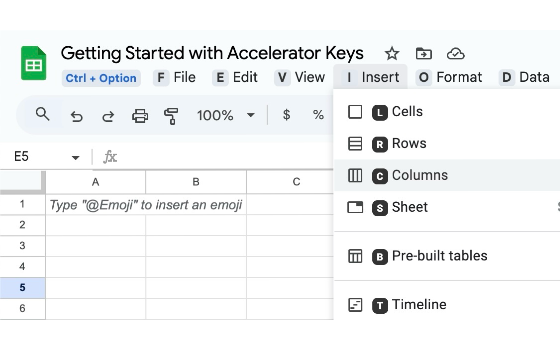
Open the overlay to see available keys and actions instantly without leaving your document or hunting through menus.
Learn By Doing
Don't memorize lists. Follow the intuitive visual hints and build long-lasting muscle memory naturally as you work.
Navigate Menus Faster
From 'File → Download → PDF' to 'Insert → Row → Below' - accomplish complex commands with simple sequential keystrokes.
Workspace Wide
Fully compatible across your entire workflow: Google Docs, Sheets, Slides, Gmail, and Google Calendar.
Secure & Private
We do not store or access your document data. Accelerator Keys runs entirely within your local browser.
Completely free.
Discover the full power of Workspace shortcuts at no cost.
Accelerator Keys Free Forever
Free
- 100% Free Chrome Extension
- Works with Docs, Sheets, Slides, Gmail, Calendar
- Interactive visual shortcut overlays
- Navigate menus with single keystrokes
- Privacy-first: no data collected